Field Operations Platform

Manage Your
Field Workforce
From One Place

CrewHub is an all-in-one operations platform built for any company that deploys workers in the field — from facilities and logistics to healthcare, utilities, and beyond.

20+ Integrated Modules
PTT Team Radio
AI Assistant & Triage

The Challenge

Field Operations Are Hard to Manage at Scale

Companies with distributed field teams face the same operational pain points — regardless of industry.

Scheduling Chaos

Spreadsheets, phone calls, and last-minute changes lead to uncovered shifts, double-bookings, and frustrated workers.

Zero Visibility

Managers can't see who's on site, who's late, or whether tasks are completed until it's too late.

Communication Gaps

Missed check-ins, unanswered welfare calls, and siloed messaging put workers and clients at risk.

Manual Paperwork

Incident reports, timesheets, and compliance documents pile up — slowing billing and creating audit risk.

HR Disconnected from Ops

Recruiting, training, and compliance live in separate systems, disconnected from day-to-day field operations.

No Actionable Data

Without real-time dashboards and analytics, leadership makes decisions based on gut feel, not facts.

The Solution

One Platform. Every Field Operation.

CrewHub unifies scheduling, live field control, push-to-talk, chat, HR, billing, inventory, and AI into a single cloud platform — purpose-built for companies with field workers.

CrewHub Platform Core Scheduling Communications HR & Training Billing & Payroll Field Mobile App AI · PTT · Chat
  • Replace 5–10 disconnected tools with one integrated platform
  • Live Active Shifts board with GPS, battery, and panic alerts
  • Mobile app: shifts, reports, gallery, assets, and team radio
  • Welfare checks plus push-to-talk and office chat
  • Manager AI assistant with preview-and-confirm actions
  • End-to-end HR, inventory custody, and knowledgebase
  • Payroll and invoicing from verified clocked hours
  • Role-based access scoped to org, client, site, or team

Product Map

Everything Operations Needs, Connected

One operating system for the office, the field, and the client — including capabilities added since the last briefing.

Schedule

Publish, copy, conflicts, import

Live Tracking

GPS trail, geofence, reports

Staff App

Clock, reports, gallery, radio

Team Radio New

Push-to-talk channels

Auto Tickets

Email, voice, panic, automations

Office Chat New

Channels and direct messages

AI Assistant New

Ask, preview, then confirm

Voice / PBX

IVR, extensions, voicemail

HR

Hire through offboarding

Inventory New

Assets, custody, movement log

Services & Rates

Custom catalog, site overrides

Patrols

Routes, stops, ETAs

Geofences

Radius or polygon per site

Knowledgebase

SOPs by site or client

n8n Automations

Events → Slack, Sheets, iPaaS

Parking

Tickets, pay, dispute portal

Technology

The Stack Behind the Platform

Modern, owned infrastructure — GraphQL as the source of record, workers for safety-critical jobs, and focused integrations rather than a tangle of point tools.

Admin console

Next.js · TypeScript

App Router admin UI, Apollo Client, Ant Design, role-aware navigation.

Field apps

React Native · Expo

AList Staff on iOS and Android. Same GraphQL API as the office console.

API

Node · Hapi · Apollo

Modular GraphQL domains, JWT sessions, Mongoose on MongoDB.

Data & jobs

MongoDB · Redis · BullMQ

Documents for ops data; queues for reminders, checkups, and detectors.

Voice & SMS

Twilio · Deepgram

Reminders, welfare calls, PBX, recordings, PTT audio, transcripts.

Intelligence

OpenAI

Email triage, manager assistant, realtime voice agents, RAG over SOPs.

Realtime

FCM · SSE chat

Push to the staff app; office chat over a dedicated messaging service.

Maps & mail

Google · IMAP / SMTP

Directions and geofences; inbound tickets; branded outbound email.

Files

Dedicated CDN

Reports, PDFs, avatars, HR files, site gallery. Synology + ffmpeg for video.

Assistant

Isolated API + workers

Live tools with the user’s JWT. Preview → confirm before any write.

Deploy

Docker Compose

API, workers, Redis, CDN, assistant, messaging — TLS reverse proxy.

Auth

Device-bound sessions

Rotating refresh tokens, IP allowlists, revoke-any-device, FCM tokens.

Architecture

How the Pieces Run Together

Clients talk to one GraphQL API. Background workers own the safety loops. Integrations send events — they never replace the scheduler or ledger.

Users
Admin Portal
Staff App
Apply / Parking Portal
Dispatch / Assistant
API Layer
GraphQL (Hapi + Apollo)
JWT / device sessions
Webhooks & IMAP
Modular domain schemas
Services
Reminder
Checkup
Voice / PTT
Assistant + RAG
Messaging
Notify (FCM)
Recordings
CDN / Video
Integrations
Twilio
OpenAI
Deepgram
Google Maps / Calendar
IMAP / SMTP
n8n / Sheets
Data
MongoDB
Redis / BullMQ
Object storage (CDN)
Synology / NFS video

Operations Command Center

Real-Time Dashboard & Analytics

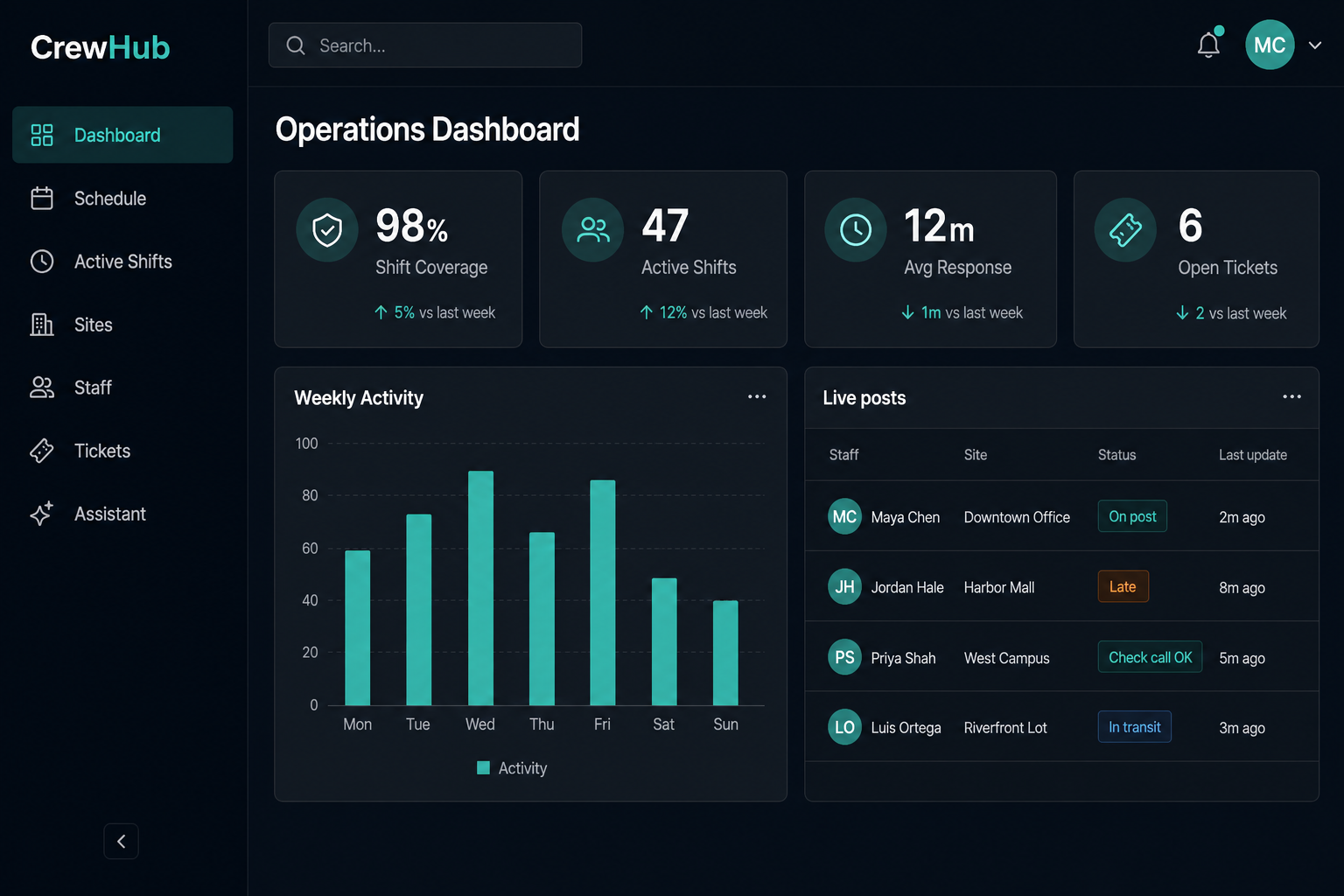
Modular, department-aware widgets — coverage, tickets, unapproved hours, and live posts. Admins set defaults in Dashboard Designer; users rearrange their own layout.

Dummy data Operations dashboard with coverage, tickets, and live posts

Illustrative admin home — Northline Security sample week. Coverage, response time, and live posts at a glance.

  • Active posts, late/missing, and unassigned shifts
  • Open and urgent ticket counts with response times
  • Unapproved hours ready for payroll
  • Department dashboards and widget density controls
  • Notification inbox and duty activity feed
  • HR applications widget for recruiting teams

Benefit: Data-Driven Decisions

Leadership sees operational health instantly — no more waiting for end-of-week reports.

Scheduling & Shifts

Intelligent Shift Scheduling

Plan, publish, and manage shifts across all clients and sites — with recurring schedules, task lists, and worker acceptance workflows.

Create Schedule

Build shifts with recurrence, services, and task checklists

Publish & Notify

Workers receive shift offers via app and SMS reminders

Accept / Reject

Workers confirm availability; managers see responses live

Start Shift

Clock-in from mobile with GPS verification

Complete Tasks

Check off assigned duties and submit reports

End Shift

Auto-calculate hours, flag late starts or overruns
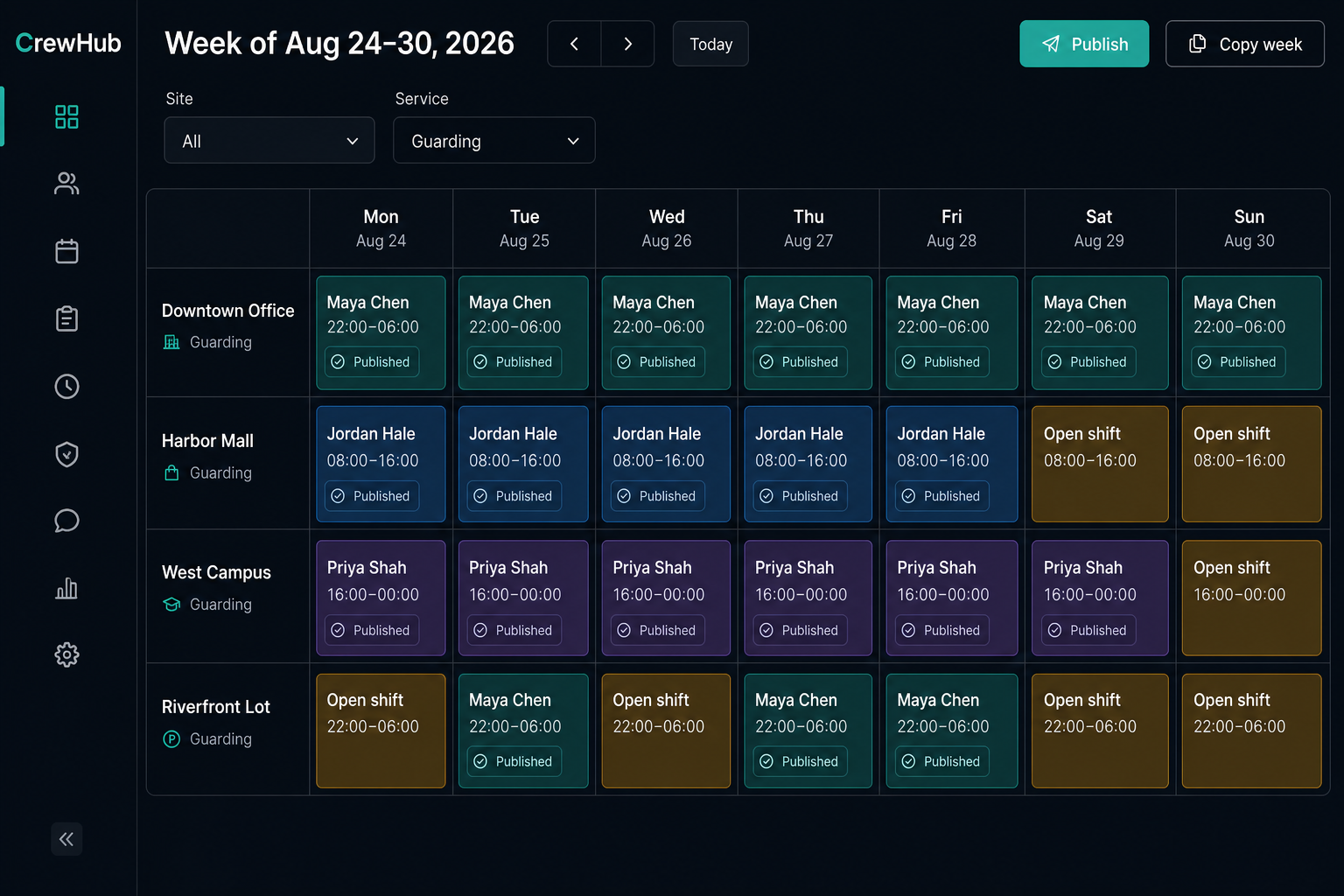
Dummy data Weekly scheduler grid with published and open shifts

Week grid with dummy sites (Downtown Office, Harbor Mall, West Campus) — published blocks, open posts, and copy/publish actions.

Recurring Schedules

Weekly patterns, copy-forward, CSV and Novagems import, conflict checks before publish.

Shift Reminders

Automated SMS and voice reminders before start, with management escalation if unanswered.

Attendance Approval

Scheduled vs clocked hours, overtime flags, then payroll and invoices from the same numbers.

Live Operations

Active Shifts Board

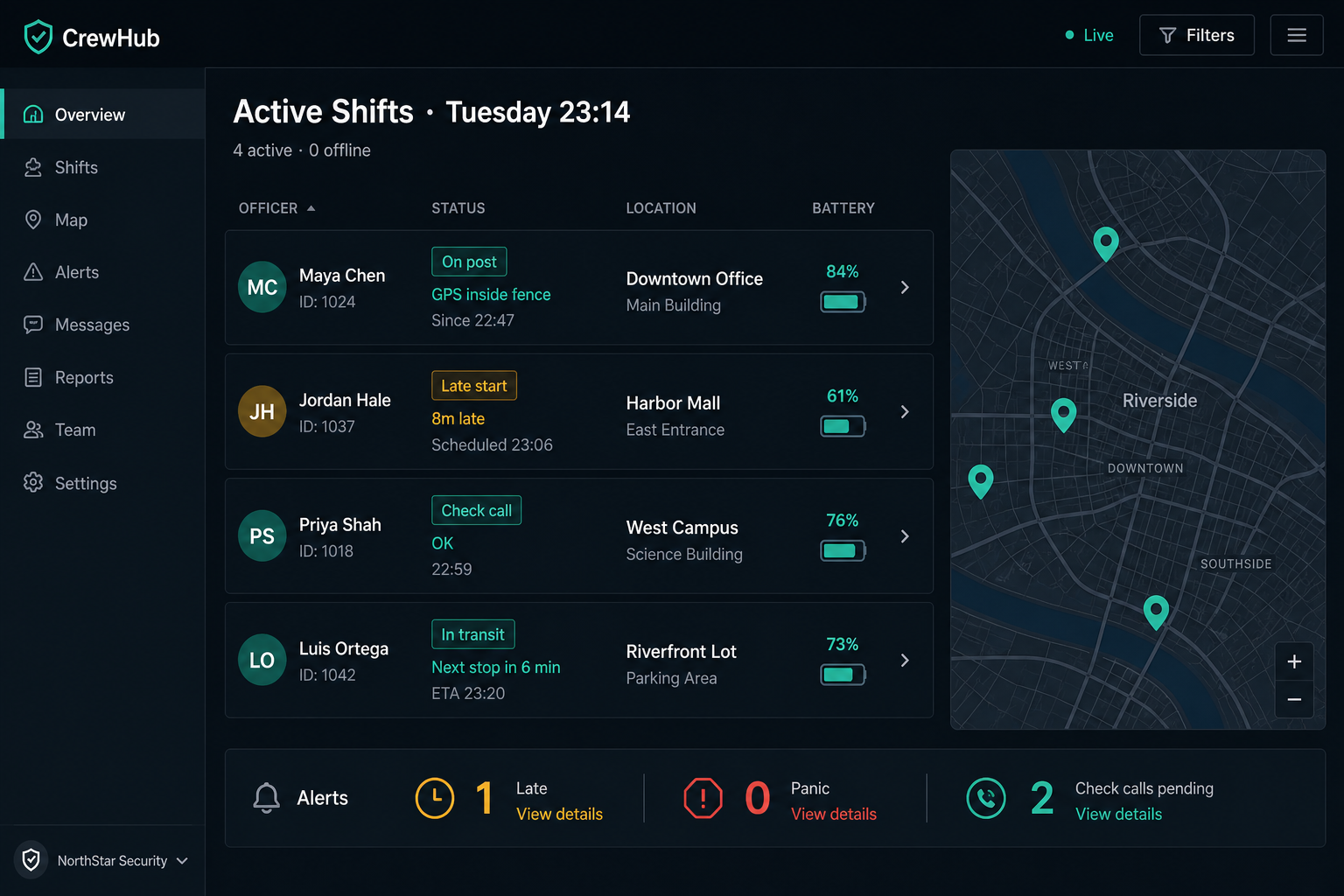
Run the night from one screen — who is on post, inside the geofence, answering check calls, or in trouble.

Dummy data Active shifts live board with GPS and alerts

Dummy Tuesday night board: Maya Chen on post, Jordan Hale late 8 minutes, check-call and in-transit states.

  • Who is on which site, with last GPS ping
  • Movement trail, geofence, and battery sampling
  • Late start, idle, and low-battery alerts
  • Welfare check-call state on the same card
  • Panic tickets raised from the phone
  • Linked reports, SMS, and voice logs

Benefit: Dispatch Without Guesswork

Supervisors stop calling around to learn who showed up. The board already knows.

Mobile Field App

Empower Your Field Workers

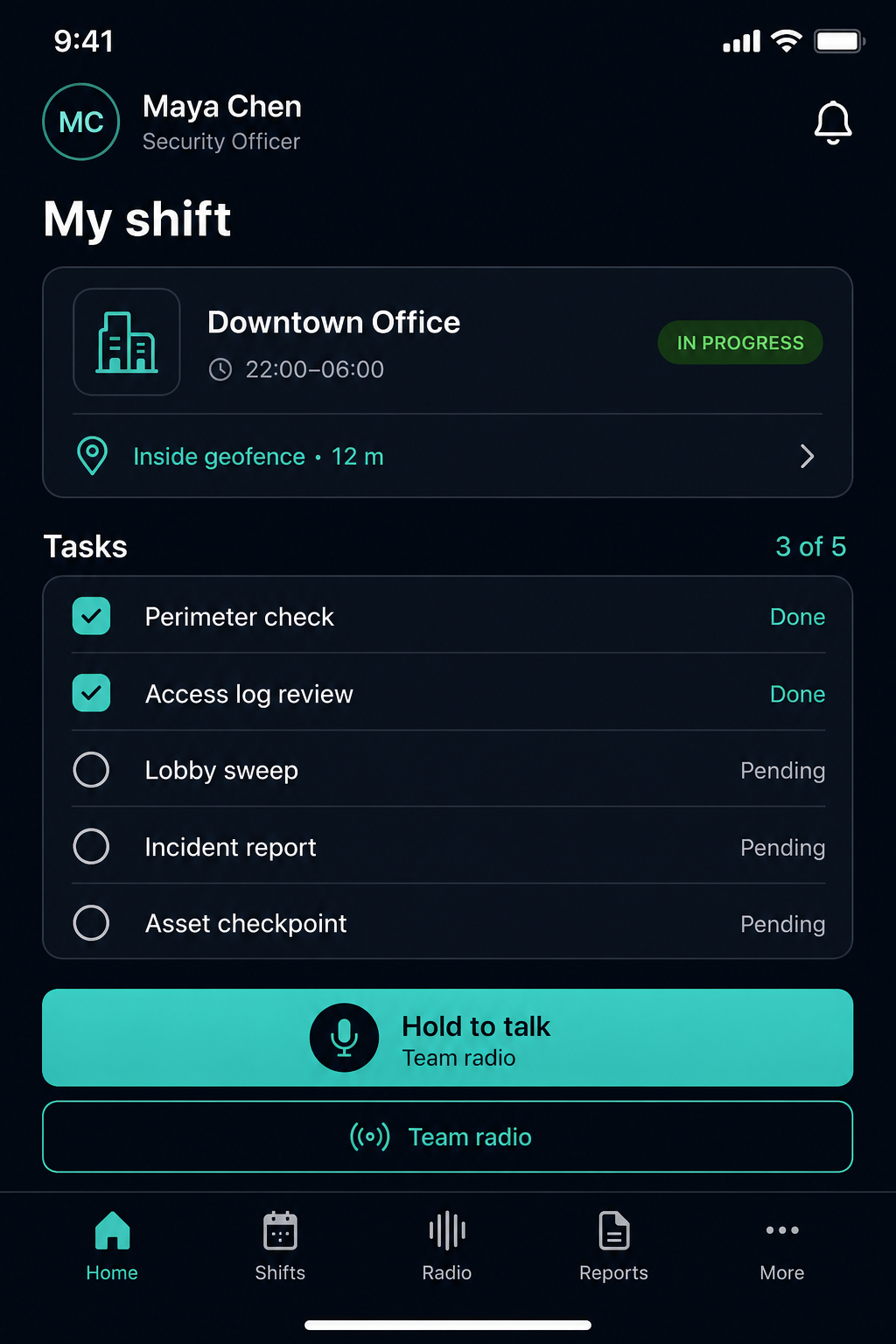
A dedicated mobile experience gives workers shifts, tasks, reports, site gallery, equipment, panic, and team radio — right in their pocket.

Staff app active shift with tasks
Team radio push-to-talk screen

Dummy field session: Downtown Office night tour and Security department radio. Data is illustrative.

  • Accept, reject, start, and end shifts
  • GPS clock-in with geofence validation
  • Patrol stop check-in / skip with ETAs
  • Reports with photos and auto PDF
  • Site gallery — photos, docs, training video
  • Asset checkpoints and QR handover
  • Panic alert to dispatch
  • Team radio (push-to-talk) on shift

Benefit: Worker Accountability

The phone is the post log — location, tasks, radio, and proof of work in one place.

Proof of Work

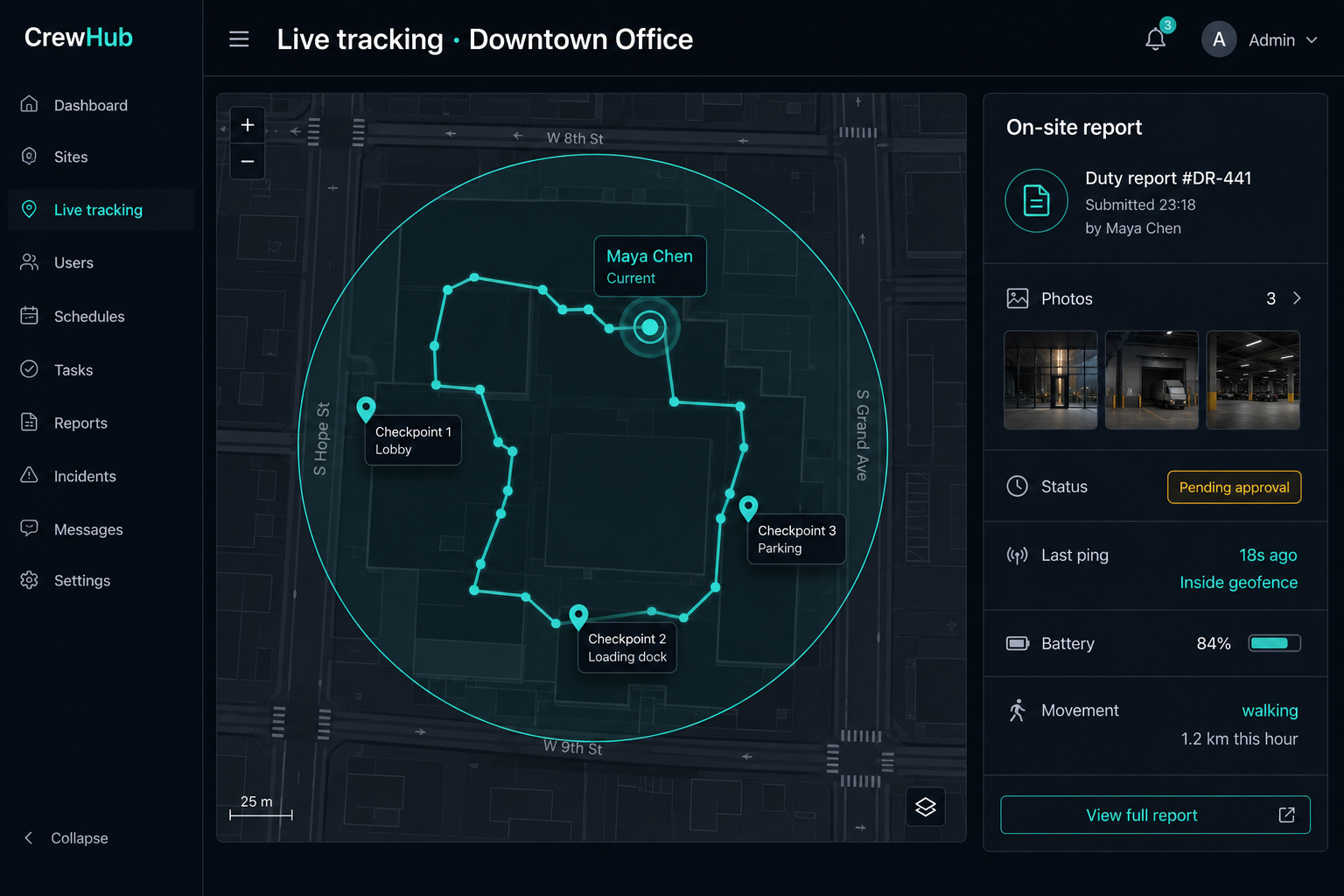
On-Site Reporting & Live Movement

Field staff submit templated reports with photos while dispatch watches GPS pings, geofence status, and the movement trail in real time.

Dummy data Live GPS trail and on-site duty report

Dummy night tour: Maya Chen’s GPS trail around Downtown Office, last ping 18s ago, duty report DR-441 pending approval.

  • Site-assigned report templates, filled on the phone
  • Photo evidence with timestamp audit, then PDF
  • Supervisor approve / reject before client delivery
  • Scheduled email of nightly reports to the client
  • Periodic GPS and battery pings while on shift
  • Movement history, idle alerts, inside/outside geofence

Benefit: See the Work as It Happens

Clients get proof. Dispatch sees who moved, who stopped, and what was filed — without a radio check.

Worker Safety

Automated Welfare Check-Ins

Protect lone and remote workers with automated check calls and SMS verification — escalating to management when workers don't respond.

Shift Active SMS Check Attempt 1 Voice Call Attempt 2-3 Escalate to Manager Worker OK Confirmed
  • Configurable check-in intervals per shift
  • Multi-channel attempts: SMS → Voice → Management
  • Automatic escalation with reason tracking
  • Manual resolution by supervisors
  • Full audit trail of all check attempts
  • Integration with shift check-call settings

Benefit: Duty of Care Compliance

Meet lone-worker safety regulations and demonstrate due diligence with automated, logged welfare checks.

Team Radio New

Push-to-Talk on the Same Platform

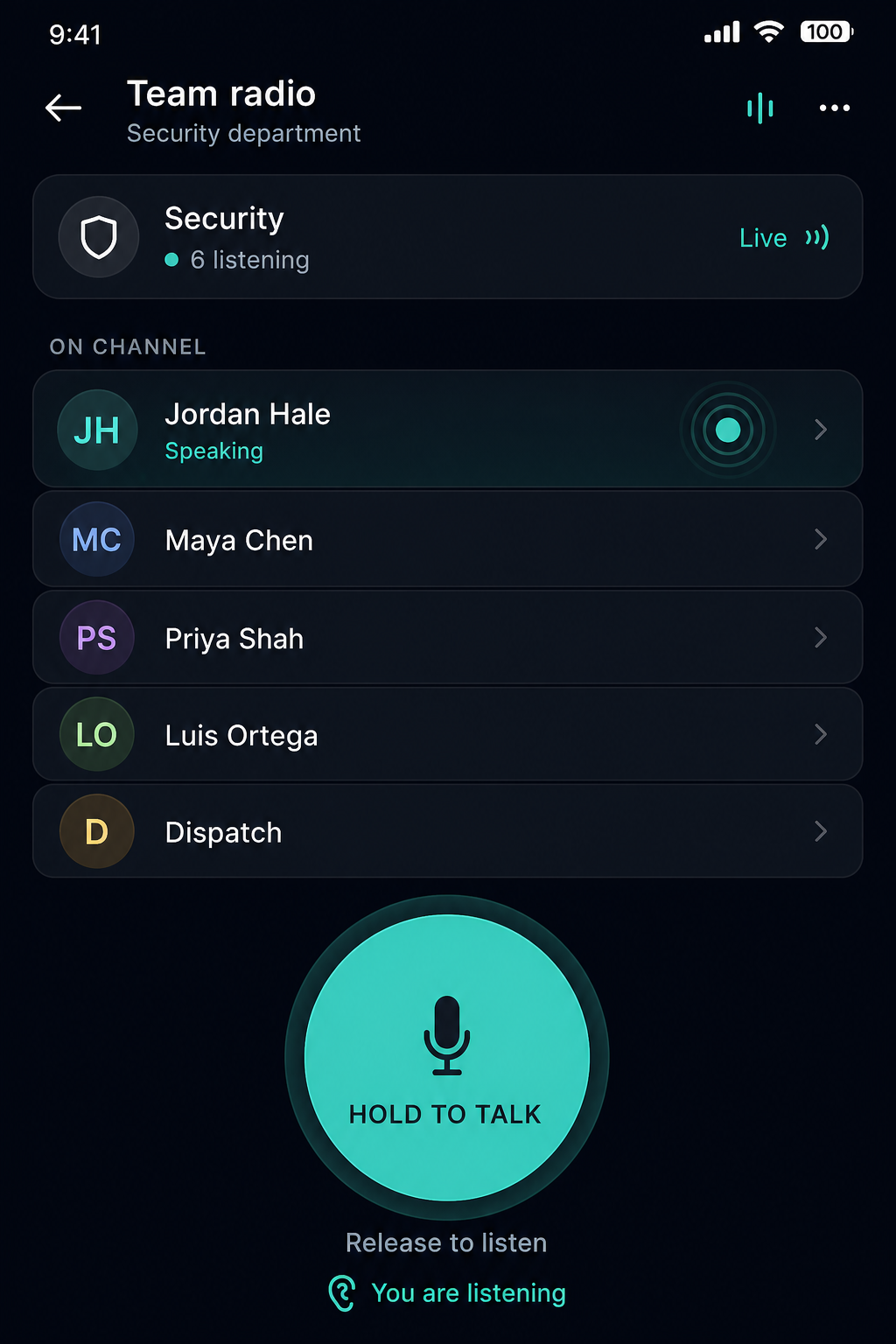
Radio-style half-duplex voice for people already on shift — no separate hardware net, with floor control, membership, and an audit trail.

Hold to talk team radio

Dummy Security department channel — six listening, Jordan Hale holding the floor.

  • Department, site, shift, and custom channels
  • One speaker at a time — press to talk, release to listen
  • Available on the staff app during an active shift
  • Admin channel list, archive, and department seed
  • Sessions logged with optional recording / transcript
  • Built on Twilio + the existing GraphQL / FCM stack

Benefit: Instant Voice Without Extra Radios

Coordinating a lobby incident takes a hold, not a phone tree — and dispatch already has the shift context.

Communications Hub

SMS, Voice, PBX & Office Chat

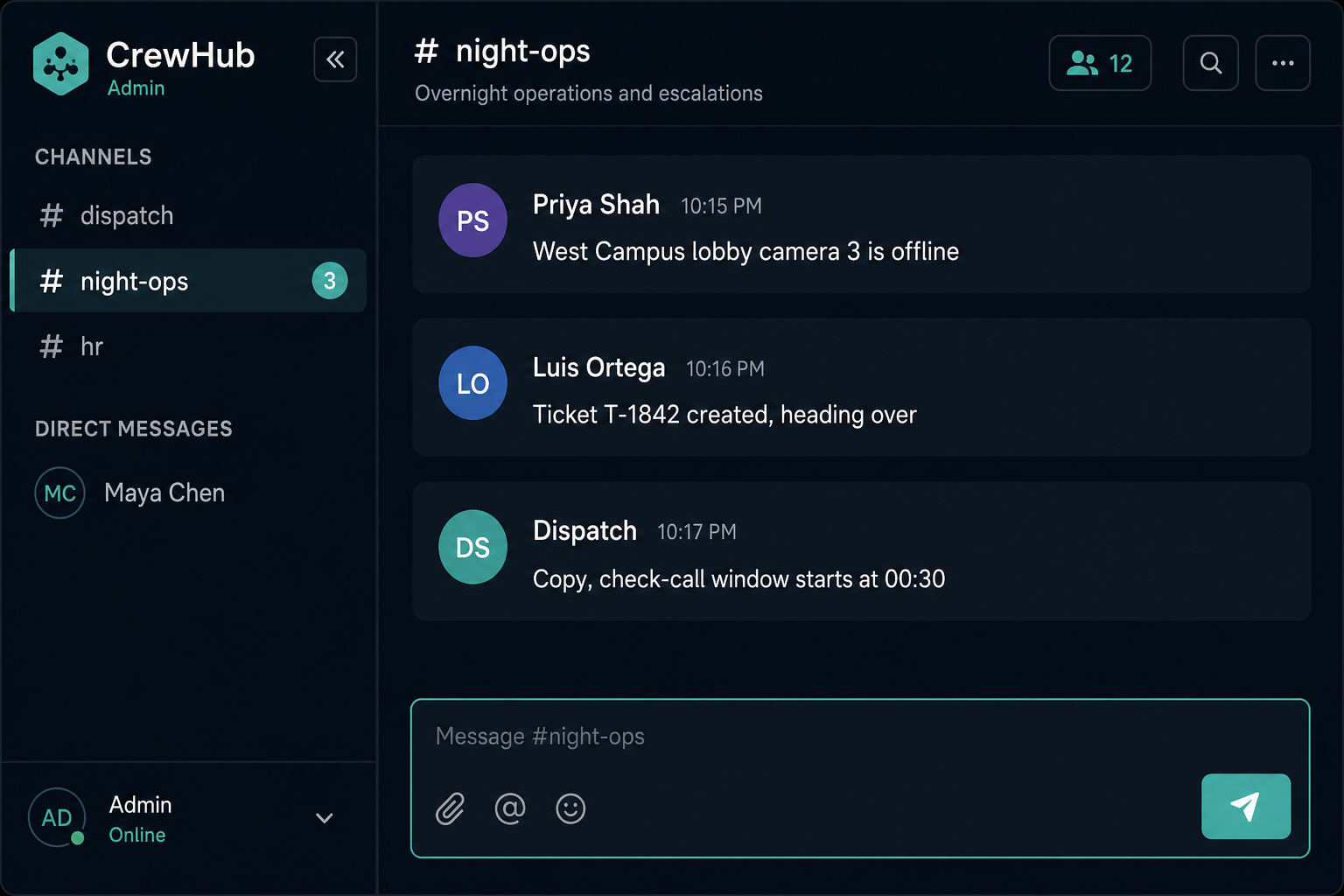
Twilio powers the phone layer. A dedicated messaging service adds company channels and DMs for the office — all linked back to shifts and tickets.

Dummy data Office chat night-ops channel

Dummy #night-ops thread — camera down, ticket T-1842, check-call window called out by dispatch.

SMS

Reminders, alerts, two-way worker messages.

Voice & PBX

Extensions, ring groups, IVR, business hours, voicemail.

Office Chat New

Common channel, groups, DMs, realtime delivery.

Recordings

Call audio, transcripts, linked communication logs.

Manager Assistant New

Ask the Live Operation in Plain Language
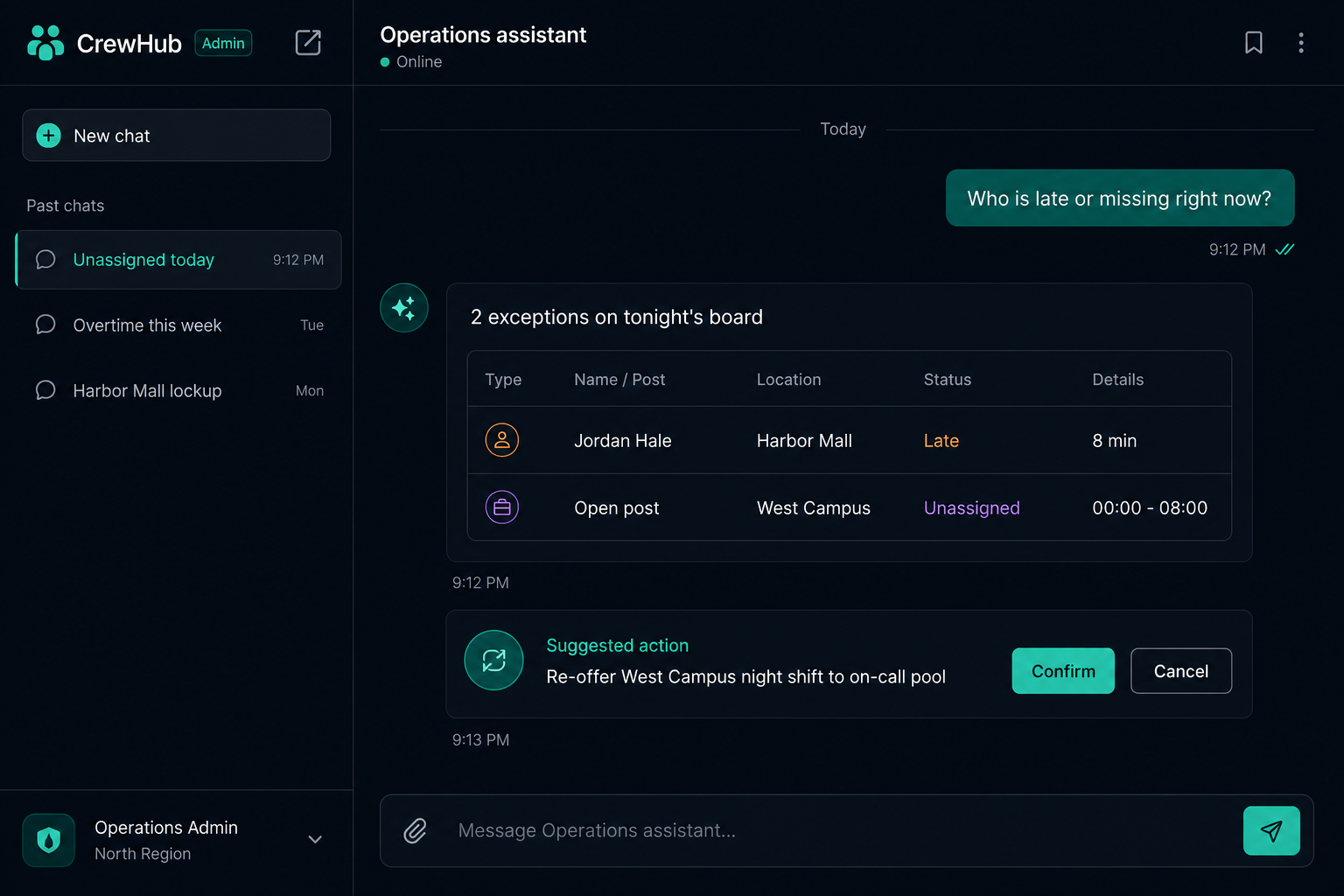
Not a generic chatbot. The assistant reads the same records dispatch uses, and never writes without a preview you confirm.

Dummy data AI assistant with late staff results and confirm action

Sample: “Who is late or missing?” returns Jordan Hale + an unassigned West Campus night — then a confirmable re-offer.

  • Coverage, lates, overtime, tickets, invoices
  • Site SOP answers via RAG — cited, not invented
  • Preview → confirm for assign, publish, ticket reply
  • Alerts inbox for late, missing, and OT detectors
  • Uses the manager’s own JWT — no extra data access
  • Rate limits, model allowlist, conversation history

Benefit: Exceptions Surface Themselves

Managers hunt less in the grid. The assistant finds the gap, shows the records, and waits for a tap to act.

AI Email Intake

AI Reads the Mail. Tickets Appear.

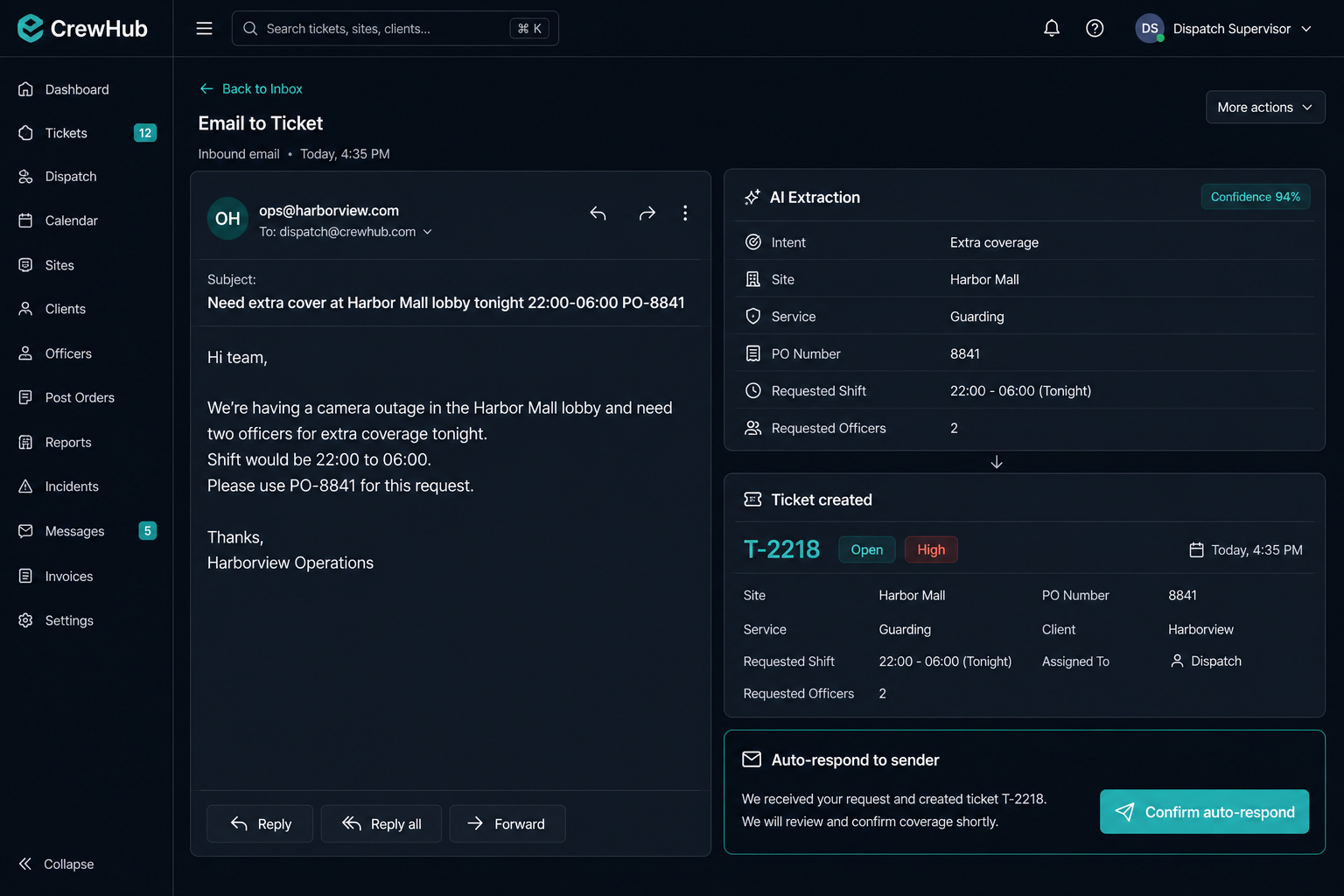
A monitored inbox is classified by OpenAI — intent, site, service, PO, confidence — then a ticket is created or the existing thread is updated. No copy-paste from Outlook.

Dummy data Inbound email classified and ticket T-2218 created

Dummy Harbor Mall extra-cover request → intent Extra coverage, PO-8841, ticket T-2218 opened at 94% confidence.

  • IMAP mailbox watched continuously
  • Domain/address blocklists drop noise first
  • AI extracts site, dates, PO, and service type
  • New ticket or append to the same email thread
  • Auto-respond when rules and confidence match
  • Corrections feed versioned prompts and evals

Benefit: Inbox Becomes a Work Queue

Client mail is work the moment it arrives — classified, ticketed, and optionally answered before a human opens it.

Client Management

Clients, Sites & Locations

Organize your operation around clients and their physical sites — with contacts, billing, geo-fences, timezone overrides, and a site gallery field staff can open on shift.

Client Profiles

Full client records with codes, status, contacts, billing information, notes, and archive support. Filter and search across your entire client base.

  • Multi-contact management per client
  • Billing info for invoicing integration
  • Regional and state-based organization

Site Management

Each client can have multiple sites with addresses, geo-coordinates, access instructions, report templates, and site-specific scheduling rules.

  • GPS coordinates and geofence (radius or polygon)
  • Billable services with site-specific rates
  • Site-specific report templates, gallery, and AI instructions

Benefit: Organized Multi-Site Operations

Whether you manage 10 sites or 10,000, CrewHub scales with hierarchical client → site → shift organization.

Site Geofencing

Draw the Post. Enforce the Clock.

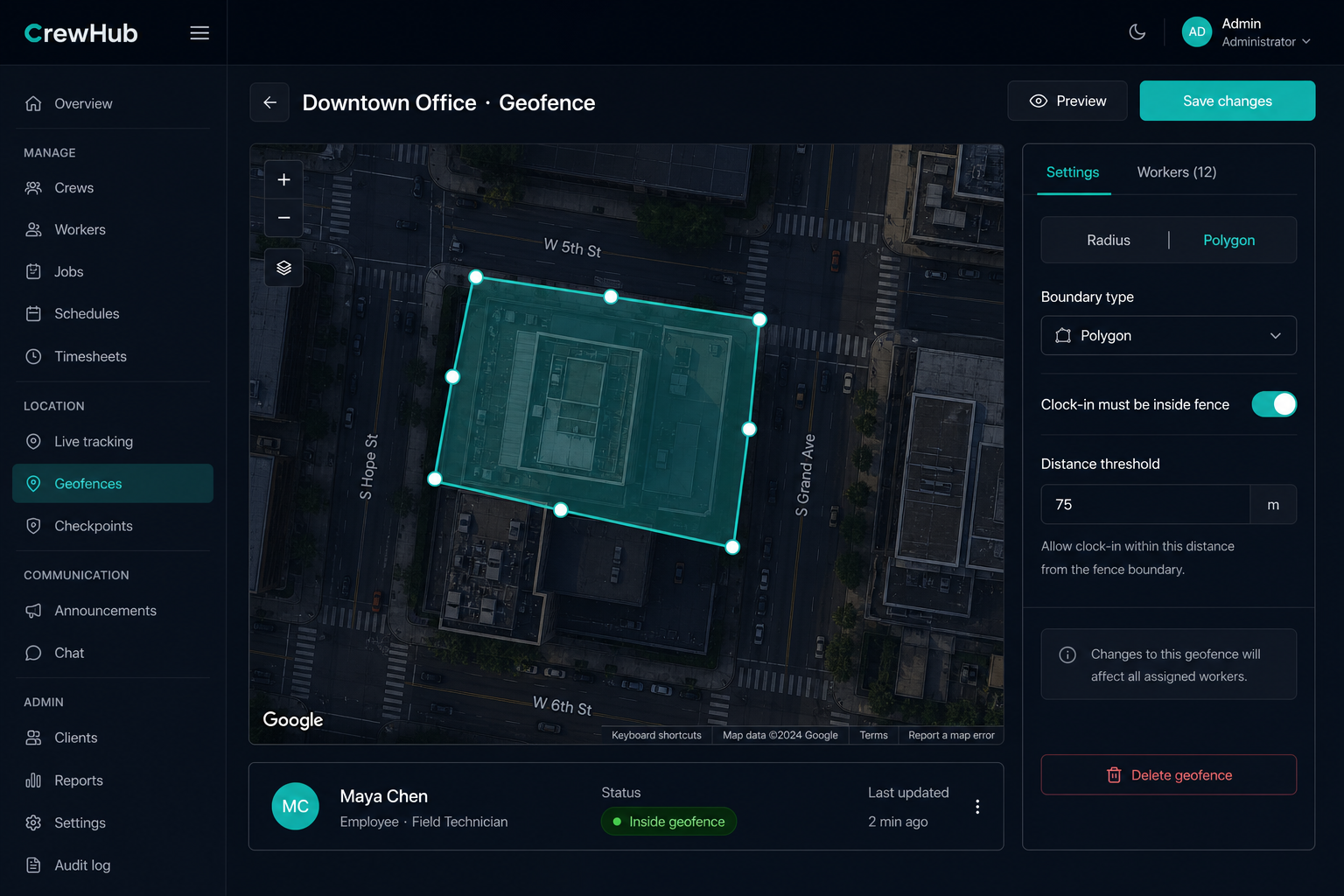
Every site can carry a geo boundary — a radius or a drawn polygon. Clock-in, patrol stops, and live tracking all check that fence.

Dummy data Downtown Office polygon geofence on the site map

Dummy Downtown Office polygon fence — clock-in must be inside; Maya Chen shown inside the boundary.

  • Radius or polygon boundary per site
  • Editable on the map when you set the site location
  • Configurable clock-in distance threshold
  • GPS clock-in rejected or flagged if outside
  • Patrol check-in / skip validated against the fence
  • Live board shows inside vs outside geofence

Benefit: Hours Tied to the Actual Post

A clock-in from the parking lot next door does not count as on site. The fence is the proof.

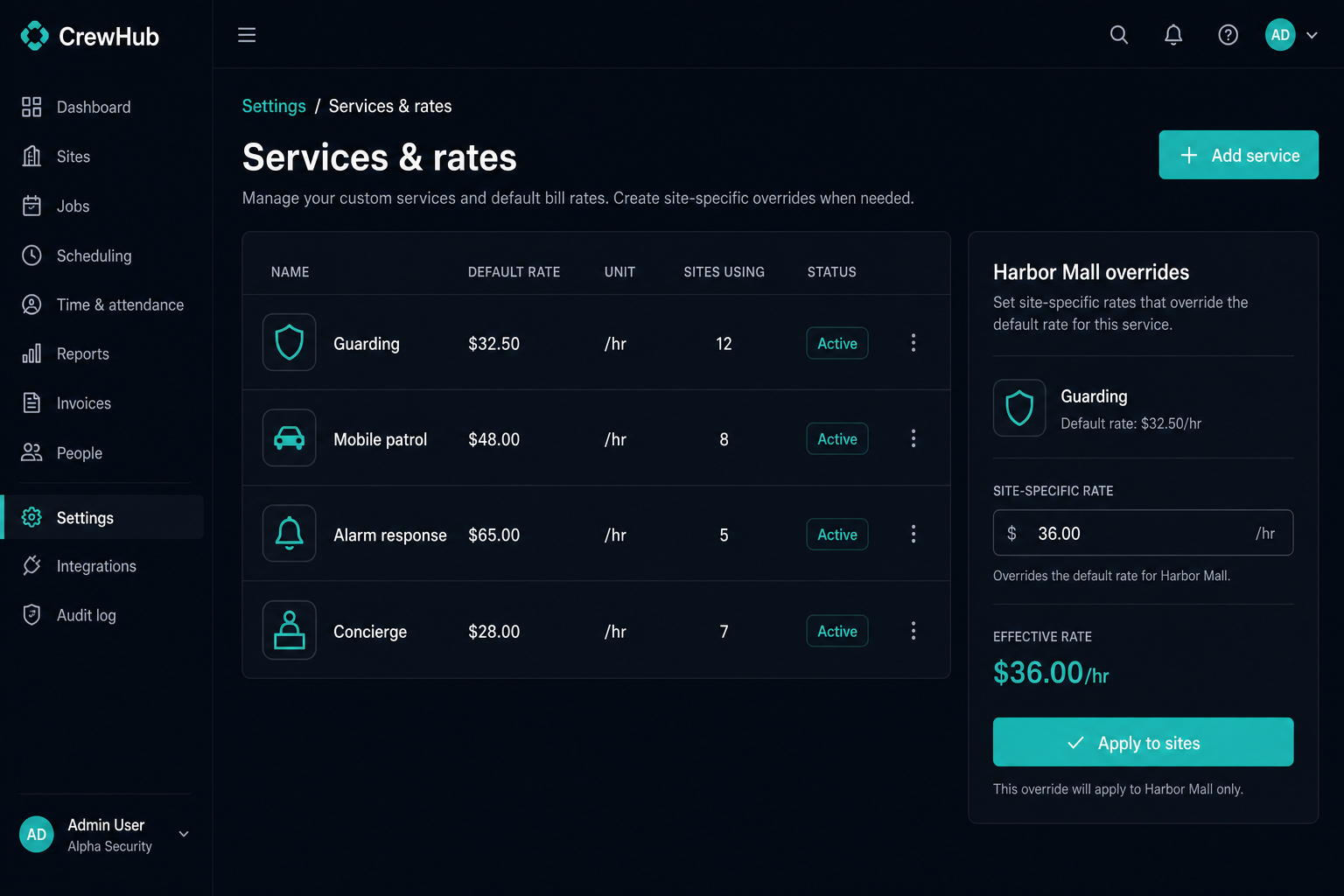
Billing Catalog

Custom Services and Rates

Define the work types you sell — guarding, mobile patrol, alarm response, concierge — with default rates, icons, and per-site overrides.

Dummy data Service catalog with default and site-specific rates

Dummy catalog: Guarding $32.50/hr default; Harbor Mall override $36.00/hr. Apply across sites in bulk.

  • Shared service catalog: name, rate, unit, icon
  • Attach services to sites with local rate overrides
  • Scheduler filters and bills by service type
  • Ad-hoc and emergency clocks land in the right bucket
  • Invoices generated from those verified service hours
  • Bulk apply a service across many sites

Benefit: One Catalog, Accurate Invoices

You are not retyping “night patrol” on every site. Rates follow the service — unless that client pays more.

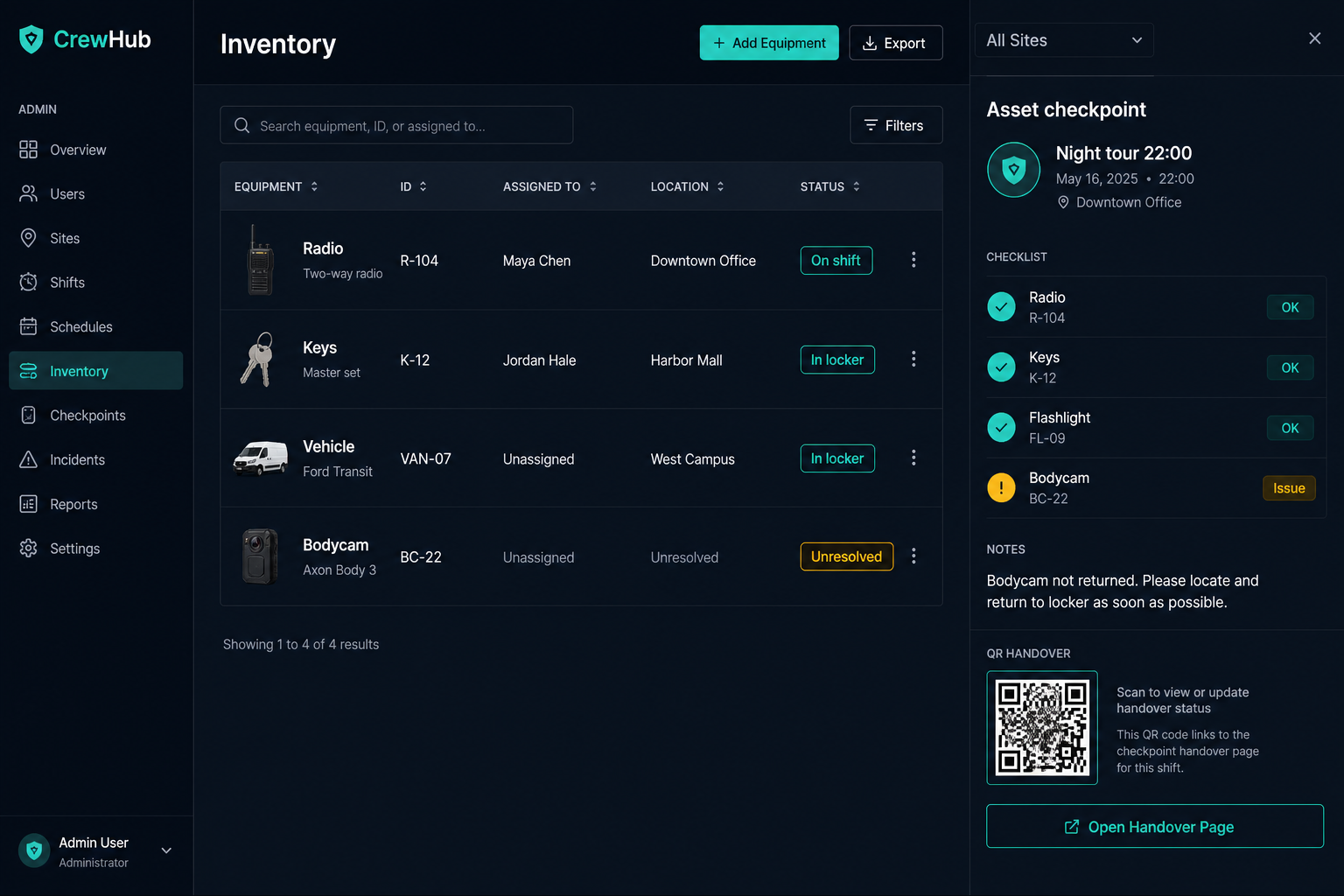
Inventory & Assets New

Asset Management and Tracking

A full registry of radios, keys, vehicles, and bodycams — who has them, where they last moved, and whether the shift checkpoint was clean.

Dummy data Inventory registry and shift checkpoint

Dummy night-tour checkpoint: Radio R-104 and keys checked; bodycam BC-22 flagged unresolved.

  • Asset registry with types, tags, IDs, and custom fields
  • Checkout, return, drop, and in-locker status
  • Required shift checkpoints at start and/or end
  • QR token handover between officers or sites
  • Full movement history — every handoff is logged
  • Unresolved queue with photo evidence to close gaps

Benefit: Kit Stops Disappearing

The next officer cannot start clean if the last one never returned the radio. The checkpoint makes that visible.

Human Resources

Complete HR Lifecycle Management

From job postings to compliance — manage your entire workforce pipeline without leaving the platform.

Recruiting

Job openings, application forms, candidate tracking, interviews, and offer management.

Worker Profiles

Permanent, hourly, on-call, contractor, seasonal, and intern worker types with full employment records.

Training

Training program management, course assignments, and completion tracking for field readiness.

Compliance & Profiles

Certifications, blacklist, worker self-service profile requests, and audit-ready documents.

Leave Management

Paid, unpaid, sick, emergency, and holiday leave requests with approval workflows.

Performance

Performance reviews, case management, and compensation tracking.

Blacklist

Maintain do-not-hire lists with reason tracking and cross-reference during hiring.

Surveys

Worker satisfaction surveys and feedback collection to improve retention.

Route Optimization

Smart Routing & Mobile Patrols

Optimize multi-site visit routes and manage mobile patrol shifts — minimizing travel time and maximizing site coverage.

S 1 2 3 Site A Site B Site C Total Distance 24.6 km Est. Duration: 1h 45m
  • Multi-stop route optimization with distance and time estimates
  • Configurable stay duration per site visit
  • Cost estimation with custom rate settings
  • Attach a saved route to a duty so the phone gets ordered stops
  • Field check-in / skip per stop with geofence and ETAs
  • Leg-by-leg breakdown with turn-by-turn distances

Benefit: Reduce Travel Costs by Up to 30%

Optimized routes mean less fuel, less time between sites, and more productive field hours.

Auto Ticketing

Tickets Create Themselves

Work enters the queue from email, voicemail, panic, and automations — then dispatch assigns, links a shift, and replies on the same thread.

Inbound Sources

IMAP email, voice/voicemail, manual dispatch, field panic, and automation-created records — one queue.

Auto-Create & Route

AI classification, department scoping, priority, auto-respond rules, and assignment to the right desk.

Close the Loop

Link client, site, and schedules. Threaded email reply. Kanban, list, or table. Complaints stay on a separate HR track.

Nothing Lands in a Shared Inbox Unseen

If mail, a voicemail, or a panic arrives, a ticket already exists — with the thread, site guess, and activity log attached.

Knowledge Base Beside the Queue

SOPs scoped general, client, or site. Staff read what applies to their post; the assistant can cite it on a ticket.

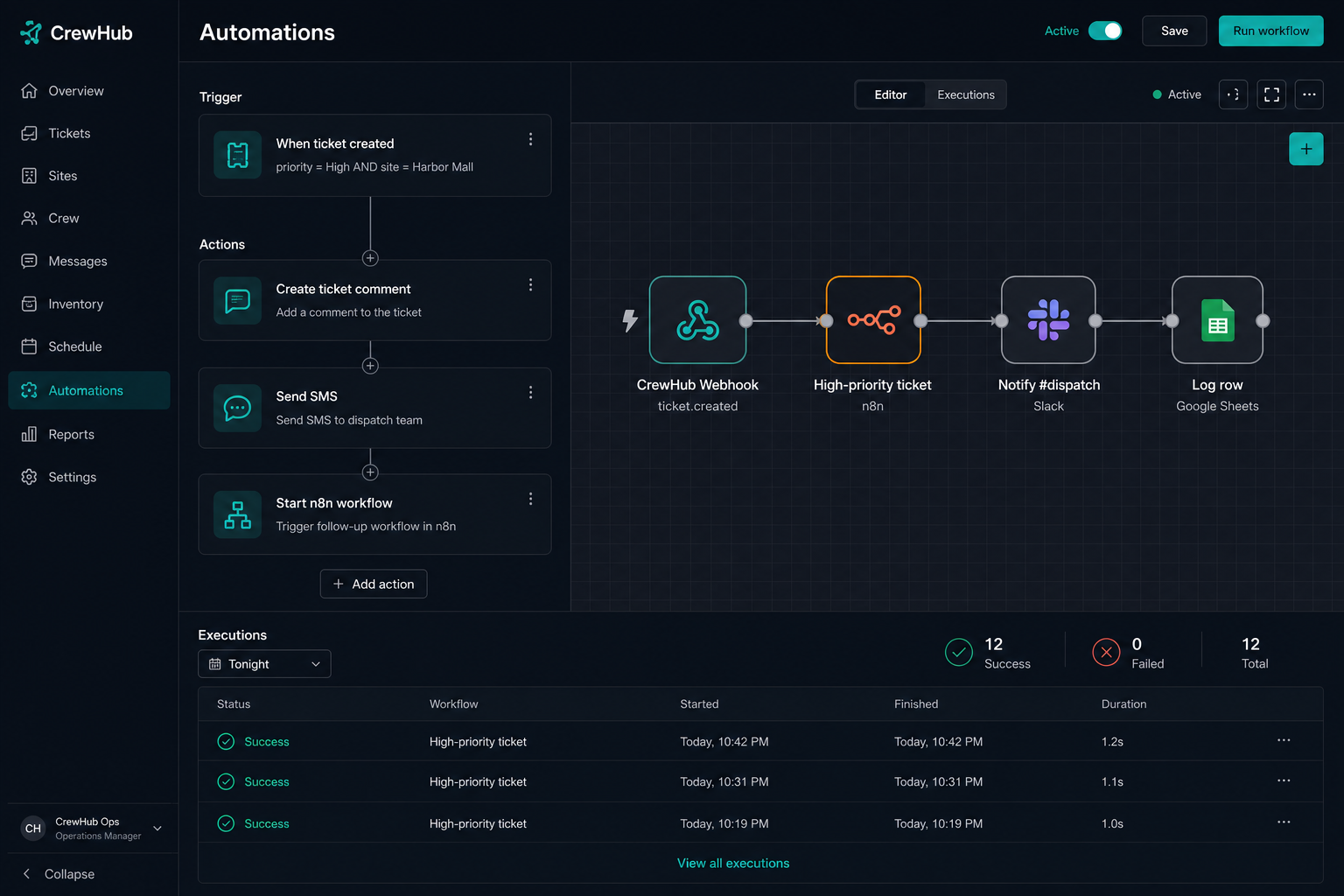
n8n & Workflows

Automations — Including n8n

When something happens in CrewHub, the platform can SMS, email, open a ticket — or start an n8n workflow so your existing Slack, Sheets, and iPaaS keep working.

Dummy data Automation rule starting an n8n workflow

Dummy rule: high-priority Harbor Mall ticket → comment + SMS + n8n → Slack #dispatch and a Sheets row.

  • Event catalog — ticket, shift, checkup, and more
  • Condition groups with priority and dedupe windows
  • Native actions: SMS, email, call, assign, comment
  • Start an n8n workflow with the event payload
  • Webhooks and Google Sheets for lighter integrations
  • Run history — which conditions matched, what succeeded

Benefit: CrewHub Stays the Source of Record

n8n fans events out to the tools you already run. Scheduling, tickets, and hours still live here.

Financial Operations

Invoicing & Payroll

Turn completed shifts into revenue — with integrated invoicing and payroll workflows tied directly to your schedule data.

Client Invoicing

Generate invoices from shift data with client billing profiles, line items, and payment tracking. Reduce billing cycles from weeks to days.

  • Shift-based invoice generation from service rates
  • Client billing contact integration
  • Unapproved hours tracking

Payroll Management

Process worker payroll based on verified shift hours, overtime flags, and approval workflows — ensuring accurate compensation.

  • Hours approval before payroll
  • Overtime and stat holiday handling
  • Shift performance metrics

Benefit: Faster Cash Flow

Accurate, automated billing from verified shift data means invoices go out faster and disputes drop dramatically.

Optional Module

Parking Enforcement

A complete parking enforcement module for municipalities and property managers — tickets, payments, disputes, and provincial integrations.

Ticket Issuance

Issue parking tickets from the field with photo evidence, location data, and violation details.

Payments

Online payment processing with partial payment, refund, and overdue tracking.

Owner Portal

Public lookup by serial and plate — pay online or file a bilingual dispute without calling the desk.

Modular design — enable only the features your business needs. Parking enforcement is one of many optional modules.

Enterprise Security

Role-Based Access & Permissions

Granular permission controls ensure every user sees only what they need — from super admins to field workers to client portal users.

Capability Admin Manager Field Worker
View Dashboard —
Manage Schedules —
Accept Shifts (Mobile) — —
HR Management —
View Invoices —
Custom Permissions
  • Module-level permission granularity
  • Custom roles bound to org, client, site, or team
  • Device sessions, revoke, and IP allowlists
  • System audit logs for compliance
  • Assistant tools inherit the user’s permissions
  • Mobile version gates (block outdated field builds)

Industries Served

Built for Any Field Workforce

CrewHub adapts to your industry — the core platform handles scheduling, communications, and workforce management for any business with workers in the field.

Security Services
Facilities Management
Logistics & Delivery
Healthcare & Home Care
Utilities & Energy
Construction
Retail & Property
Parking & Enforcement
Environmental Services
Hospitality & Events
Maintenance & Repair
Agriculture
1
Platform
∞
Industries
Any
Team Size
Any
Site Count

Return on Investment

Measurable Business Impact

Companies using CrewHub see tangible improvements across operations, finance, and worker satisfaction.

40% Reduction in Admin Time

Automated scheduling, reminders, and reporting eliminate hours of manual coordination daily.

95%+ Shift Coverage

Real-time visibility and automated alerts ensure shifts are covered — no more last-minute scrambles.

Faster Billing Cycles

Shift-verified invoicing cuts billing from weeks to days, improving cash flow and reducing disputes.

100% Welfare Check Compliance

Automated lone-worker check-ins with full audit trails meet regulatory requirements effortlessly.

Up to 30% Travel Cost Savings

Route optimization reduces unnecessary travel between sites for mobile teams.

60% Faster Ticket Resolution

AI triage routes issues instantly — cutting average response times from hours to minutes.

Why CrewHub

Why Choose CrewHub?

See how CrewHub compares to juggling multiple disconnected tools.

Feature Spreadsheets & Email Multiple Point Solutions CrewHub
Unified scheduling & shifts
Mobile field worker app
SMS & voice welfare checks
Site geofences (radius or polygon)
Custom services and rates
On-site reports + live GPS tracking
AI email reading & auto ticket creation
n8n / webhook automations
Manager AI assistant (confirm-to-write)
Push-to-talk team radio
Inventory & asset tracking
Integrated HR & payroll
Route optimization
Automation engine
Single source of truth

Get Started

Ready to Transform Your
Field Operations?

Join companies that have replaced spreadsheets and disconnected tools with one powerful platform. Schedule a demo to see CrewHub in action.

Cloud Hosted
Enterprise Security
Dedicated Support
Modular & Scalable

CrewHub Field Operations Platform © 2026

← → navigate   F fullscreen
Interested! contact me now